 f77843f4a5
* builder: Use 64-bit Raspberry Pi OS * travis: Use 64-bit builder * builder: Don't try to install Melodic packages on Noetic * clover: Use package version 3, update dependencies * travis: Enable Noetic build * standalone_install: Auto-select Python, ROS distro * builder: Use variable substitution for ROS_DISTRO * builder: Add Noetic package definitions * builder: Use variable substitution for validation * aruco_pose, clover: Allow compiling against OpenCV 3 and 4 * builder: Add proper Noetic repository * builder: Don't force Tornado version Assume rosbridge_suite depends on the right one. * builder: Install packages for Python 3 * builder/test: Use Python3 interpreter for ROS tests TODO (?): add tests for Python2? * builder: Use Python 3 syntax for Python 3 tests * builder: Install rpi_ws281x for Python3 * standalone_install: Use proper Python for pytest * builder: Install espeak for python3 * builder: Use proper path for roscore * builder: Install rosdep, etc. for python3 * builder: Run Clever/Clover test with Python3 * builder: Use Python3 for Clever compat layer * builder: Enable OpenCV 4.2 repository * builder: Force versions for ROS packages that use OpenCV Also, hold their versions so that they don't get updated for no reason. * aruco_pose/draw: Replace OpenCV projection code with a rewrite * builder: Don't try to install compressed_transport twice * clover: Fix importing urllib for Python3 * aruco_pose, clover: Expose Python scripts through CMake * clover/selfcheck: Be more python3-compatible This is basically commita01d199890from buster-python3, not sure if it aged well. * roswww_static: Add python script installation * clover_blocks: Use Python3 syntax for exec * aruco_pose: Remove unused code * Melodic => Noetic in some docs * docs: add 0.22 migration article * docs: remove unneeded comment * docs: python 3 updates * docs: python 3 update in auto_setup article * docs: add ROS Noetic transition note * aruco.launch: add placement, length and map arguments * genmap.py: add -o argument for output file name * docs: use -o argument of genmap.py * simple_offboard: correctly check manual control timeout, separate it from kill switch check * blocks: force led_leds index to int * docs: update and fix 0.22 migration articles * blocks: fix set_leds with color-typed argument * aruco_gen: Open file in binary mode for Python3 compatibility * clover: Use proper variable in aruco.launch * led: change default number of leds to 72 * aruco_pose: Make sure there are no undefined symbols Also, compile in apriltag_quad_thresh.cpp - it contains some of the functions referenced in aruco.cpp, which would otherwise be undefined. * aruco_pose: Make vendored library compatible with older OpenCVs * aruco_pose, clover: Reduce the amount of OpenCV libs requested * aruco_pose, clover: Move subscriptions to the end of init * aruco_pose: Don't expose vendored library symbols * aruco_pose: Simplify dynamic parameter callback setting * builder: Build with debug symbols * clover: Attempt to respawn dying nodelets * Change Raspberry Pi OS to latest armhf, use packages.coex.tech as a source * Add CRYPTOGRAPHY_DONT_BUILD_RUST=1 * Fix Node.js installation * image: use older CMake (3.13.4-1) Fixing https://travis-ci.org/github/CopterExpress/clover/jobs/764367665#L6984 * image: update Raspberry Pi OS to 2021-03-04 * image: bring back moving ld.so.preload out of the way while building * Fix pthreads ld error * Try to fix pthreads ld error * Another attempt to fix pthreads ld error * Yet another attempt to fix pthreads ld error * Try to fix * Be verbose * Temporarily disable rc and camera_markers building * Fix standalone-install * Revert "Temporarily disable rc and camera_markers building" This reverts commite119220e91. * Try to fix * Try to fix * Revert "image: use older CMake (3.13.4-1)" This reverts commitdf28da0060. * Revert "Revert "image: use older CMake (3.13.4-1)"" This reverts commita28c774e8f. * Verbosity * Debugging * More debugging * Display all CMake variables * Try to fix * Another try to fix * Revert "Another try to fix" This reverts commit5a4c3a0da7. * Another try to fix * And another * And yet another * Continue... * Cleanup * Sources lists cleanup * More cleanup * Restore .git directory in clover repo * Fix building documentation * Fix documentation building in image * Trigger build to update ws281x package * Test * Disable unneeded hack * Disable hack * image: add cmake-modules package * www: add viewing clover.err file from web interface * Remove hacks * Show nodelet version * docs: add packages article * image: add image-view package for recording video from topics * Minor fix * CI: add Docker authentication on image build * CI: fix Bash syntax * CI: fix authentication in Docker * CI: move Melodic build and editorconfig-lint to GitHub Actions (#331) * Create main.yml * Update main.yml * Disable native Melodic build in Travis * Run editorconfig-lint in Actions * Let wget be less verbose * Test * Test ok * Disable editorconfig-lint in Travis * docs: add links to hardware sources * CI: move image building to GitHub actions (#335) * Start working on building image in GitHub actions * Trigger GitHub on push to any branch * Fix TRAVIS_TAG * Add compress image step * Disable image build in Travis * Add upload image step * Fix compress image * Fix * Fix * Minor fix * Trigger build on tag * Show images sizes not in human format * Upload only built image * Make prerelease * Upload assets on release not on tags * readme: change build badge to GitHub Actions * readme: add support chat badge * CI: move documentation building to GitHub Actions (#337) * CI: change docs target branch to actions * CI: change docs target branch to master * CI: use gh-pages target branch for docs * CI: split up to several workflows * CI: remove .travis.yml * CI: change apt to apt-get * CI: push documentation site to the main repo * builder: less verbosity * CI: add new key for apt Fixing https://github.com/CopterExpress/clover/runs/2700356960#step:3:74 * Add Noetic building to CI * Add test for QR recognition * Fix * Move QR recognition test to a separate file * Fix QR recognition code for Python 3 * Import SetLEDs, LEDStateArray, LEDState in tests * Add more imports to tests (from documentation) * Fix permissions * Fix standalone-install for Python 2 * Fix QR recognition test * Don’t use ROS for QR recognition test * docs: remove non-working example * Make v4l2 device file an argument in main_camera.launch * Wait for v4l2 device before launching the camera driver * Use exec in waitfile * Transfer main camera nodelet manager to main_camera.launch * Update cv_camera version to 0.5.1 * docs: minor fix * Revert cv_camera to 0.5.0 * Update Raspberry Pi OS to 2021-05-07 * docs: add link to the last ROS Melodic version. Co-authored-by: Alexey Rogachevskiy <sfalexrog@gmail.com>
4.6 KiB
Contribution to Clover
Clover is mostly an open source and open hardware project aimed at lowering the entry threshold to development of the projects related to flying robotics. You can contribute to the project by offering fixes and improvements for Clover documentation and software.
Note
To offer changes to Clover documentation or SW, you should have an account at GitHub.
Markdown
All Clover documentation is written in the widespread Markdown format. There are many Markdown guides on the Internet.
In Russian: https://guides.hexlet.io/markdown/.
In English: https://www.markdownguide.org/getting-started, https://github.com/adam-p/markdown-here/wiki/Markdown-Cheatsheet.
For the ease of editing texts, you may use text editors with Markdown support: Typora, Dillinger (web), VSCode with the Markdown Editor plugin.
We also recommend using the Code Spell Checker VScode plugin.
For a local build of a static documentation website, use the gitbook-cli utility.
Fixing documentation errors
If you have found an error in the documentation or if you want to improve it, use the Pull Request mechanism.
-
Find a file with the article you want in the repository – https://github.com/CopterExpress/clover/tree/master/docs.
-
Click "Edit".
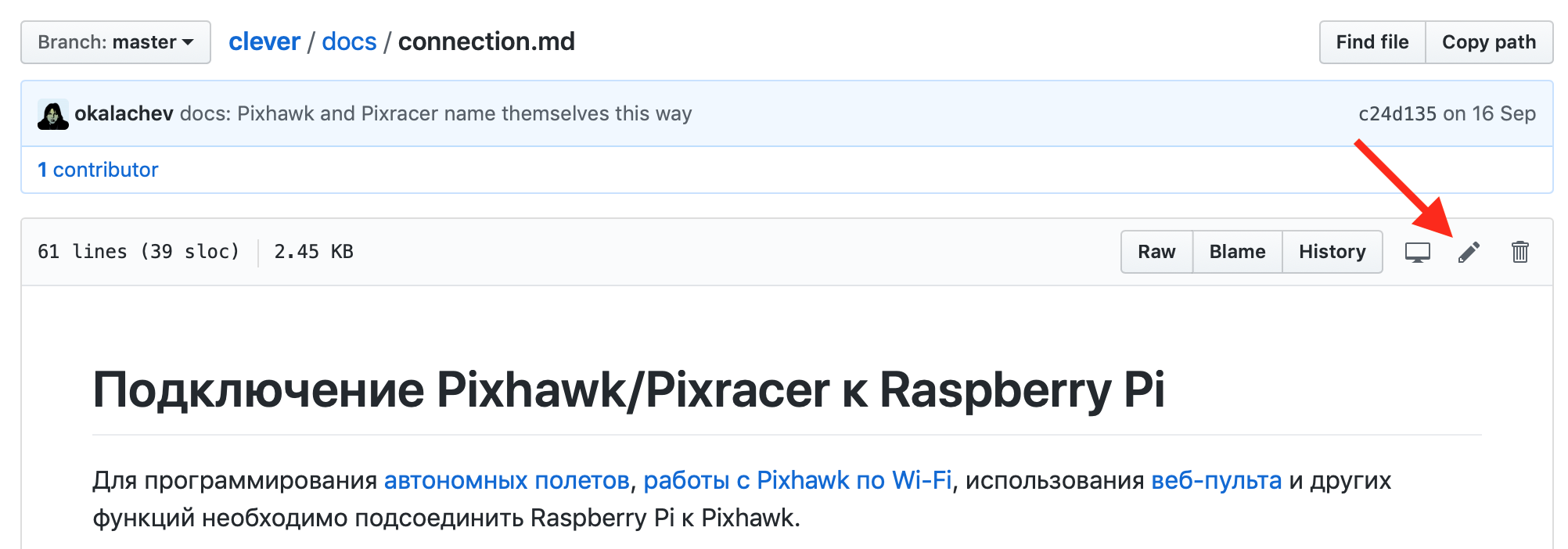
-
Make the necessary changes.
-
Click "Propose file change".
-
Describe the change you have made, and click "Create a Pull Request".
-
Wait for your changes to be approved :)

More information about Pull Requests is available at GitHub (English) or in GIT documentation (Russian).
Contributing a new article
Note
If you've made your own project based on Clover, you can add an article about it to the "Clover-based projects" section.
Prepare your article and send it as a pull request to the Clover repository.
-
Fork the Clover repository:

-
Check out the freshly-forked repository on your computer:
git clone https://github.com/<USERNAME>/clover.git -
Open the directory with the source code checkout and create a new branch for your article (for example,
new-article):git checkout -b new-article -
Write a new article in the Markdown format and save it in the
docs/ruordocs/enfolder (for example,docs/en/new_article.md). Don't forget to give you contacts (e-mail / Telegram / ...) in articles on your projects. -
Place additional visual assets in the
docs/assetsfolder and add them to your article. -
Add a link to your article to the appropriate section in the
SUMMARY.mdfile (in the same folder as in the fourth step):... * Supplementary materials * [COEX Pix](coex_pix.md) * [Contribution guidelines](contributing.md) * [New article](new_article.md) * [RC troubleshooting](radioerrors.md) * [Flashing ESCs](esc_firmware.md) ... -
Commit your changes locally:
git add docs/ git commit -m "Add new article for Clover" -
Upload your branch to your forked repository on GitHub:
git push -u origin new-article -
Open your repository on GitHub and send a
pull requestfrom your branch to Clover: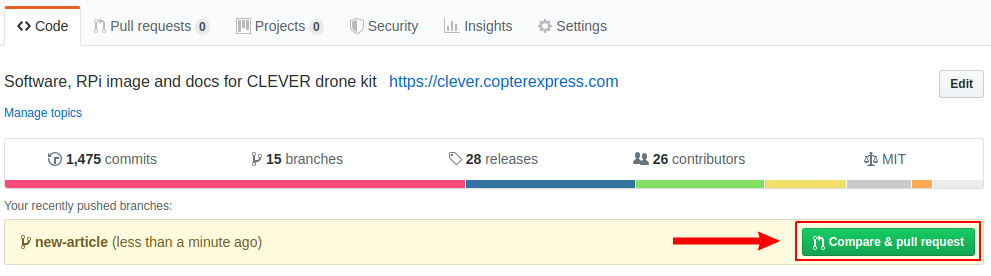

-
Wait for the review, be ready to make changes if needed.
-
Look at your new and useful article at https://clover.coex.tech !


Easy way
If the above instructions are too difficult for you, send your fixes and new articles by e-mail (okalachev@gmail.com) or in Telegram messenger (user @okalachev).
Publishing packages
You also can publish a package, that extends Clover functionality, into the official COEX Debian repository.