 f77843f4a5
* builder: Use 64-bit Raspberry Pi OS * travis: Use 64-bit builder * builder: Don't try to install Melodic packages on Noetic * clover: Use package version 3, update dependencies * travis: Enable Noetic build * standalone_install: Auto-select Python, ROS distro * builder: Use variable substitution for ROS_DISTRO * builder: Add Noetic package definitions * builder: Use variable substitution for validation * aruco_pose, clover: Allow compiling against OpenCV 3 and 4 * builder: Add proper Noetic repository * builder: Don't force Tornado version Assume rosbridge_suite depends on the right one. * builder: Install packages for Python 3 * builder/test: Use Python3 interpreter for ROS tests TODO (?): add tests for Python2? * builder: Use Python 3 syntax for Python 3 tests * builder: Install rpi_ws281x for Python3 * standalone_install: Use proper Python for pytest * builder: Install espeak for python3 * builder: Use proper path for roscore * builder: Install rosdep, etc. for python3 * builder: Run Clever/Clover test with Python3 * builder: Use Python3 for Clever compat layer * builder: Enable OpenCV 4.2 repository * builder: Force versions for ROS packages that use OpenCV Also, hold their versions so that they don't get updated for no reason. * aruco_pose/draw: Replace OpenCV projection code with a rewrite * builder: Don't try to install compressed_transport twice * clover: Fix importing urllib for Python3 * aruco_pose, clover: Expose Python scripts through CMake * clover/selfcheck: Be more python3-compatible This is basically commita01d199890from buster-python3, not sure if it aged well. * roswww_static: Add python script installation * clover_blocks: Use Python3 syntax for exec * aruco_pose: Remove unused code * Melodic => Noetic in some docs * docs: add 0.22 migration article * docs: remove unneeded comment * docs: python 3 updates * docs: python 3 update in auto_setup article * docs: add ROS Noetic transition note * aruco.launch: add placement, length and map arguments * genmap.py: add -o argument for output file name * docs: use -o argument of genmap.py * simple_offboard: correctly check manual control timeout, separate it from kill switch check * blocks: force led_leds index to int * docs: update and fix 0.22 migration articles * blocks: fix set_leds with color-typed argument * aruco_gen: Open file in binary mode for Python3 compatibility * clover: Use proper variable in aruco.launch * led: change default number of leds to 72 * aruco_pose: Make sure there are no undefined symbols Also, compile in apriltag_quad_thresh.cpp - it contains some of the functions referenced in aruco.cpp, which would otherwise be undefined. * aruco_pose: Make vendored library compatible with older OpenCVs * aruco_pose, clover: Reduce the amount of OpenCV libs requested * aruco_pose, clover: Move subscriptions to the end of init * aruco_pose: Don't expose vendored library symbols * aruco_pose: Simplify dynamic parameter callback setting * builder: Build with debug symbols * clover: Attempt to respawn dying nodelets * Change Raspberry Pi OS to latest armhf, use packages.coex.tech as a source * Add CRYPTOGRAPHY_DONT_BUILD_RUST=1 * Fix Node.js installation * image: use older CMake (3.13.4-1) Fixing https://travis-ci.org/github/CopterExpress/clover/jobs/764367665#L6984 * image: update Raspberry Pi OS to 2021-03-04 * image: bring back moving ld.so.preload out of the way while building * Fix pthreads ld error * Try to fix pthreads ld error * Another attempt to fix pthreads ld error * Yet another attempt to fix pthreads ld error * Try to fix * Be verbose * Temporarily disable rc and camera_markers building * Fix standalone-install * Revert "Temporarily disable rc and camera_markers building" This reverts commite119220e91. * Try to fix * Try to fix * Revert "image: use older CMake (3.13.4-1)" This reverts commitdf28da0060. * Revert "Revert "image: use older CMake (3.13.4-1)"" This reverts commita28c774e8f. * Verbosity * Debugging * More debugging * Display all CMake variables * Try to fix * Another try to fix * Revert "Another try to fix" This reverts commit5a4c3a0da7. * Another try to fix * And another * And yet another * Continue... * Cleanup * Sources lists cleanup * More cleanup * Restore .git directory in clover repo * Fix building documentation * Fix documentation building in image * Trigger build to update ws281x package * Test * Disable unneeded hack * Disable hack * image: add cmake-modules package * www: add viewing clover.err file from web interface * Remove hacks * Show nodelet version * docs: add packages article * image: add image-view package for recording video from topics * Minor fix * CI: add Docker authentication on image build * CI: fix Bash syntax * CI: fix authentication in Docker * CI: move Melodic build and editorconfig-lint to GitHub Actions (#331) * Create main.yml * Update main.yml * Disable native Melodic build in Travis * Run editorconfig-lint in Actions * Let wget be less verbose * Test * Test ok * Disable editorconfig-lint in Travis * docs: add links to hardware sources * CI: move image building to GitHub actions (#335) * Start working on building image in GitHub actions * Trigger GitHub on push to any branch * Fix TRAVIS_TAG * Add compress image step * Disable image build in Travis * Add upload image step * Fix compress image * Fix * Fix * Minor fix * Trigger build on tag * Show images sizes not in human format * Upload only built image * Make prerelease * Upload assets on release not on tags * readme: change build badge to GitHub Actions * readme: add support chat badge * CI: move documentation building to GitHub Actions (#337) * CI: change docs target branch to actions * CI: change docs target branch to master * CI: use gh-pages target branch for docs * CI: split up to several workflows * CI: remove .travis.yml * CI: change apt to apt-get * CI: push documentation site to the main repo * builder: less verbosity * CI: add new key for apt Fixing https://github.com/CopterExpress/clover/runs/2700356960#step:3:74 * Add Noetic building to CI * Add test for QR recognition * Fix * Move QR recognition test to a separate file * Fix QR recognition code for Python 3 * Import SetLEDs, LEDStateArray, LEDState in tests * Add more imports to tests (from documentation) * Fix permissions * Fix standalone-install for Python 2 * Fix QR recognition test * Don’t use ROS for QR recognition test * docs: remove non-working example * Make v4l2 device file an argument in main_camera.launch * Wait for v4l2 device before launching the camera driver * Use exec in waitfile * Transfer main camera nodelet manager to main_camera.launch * Update cv_camera version to 0.5.1 * docs: minor fix * Revert cv_camera to 0.5.0 * Update Raspberry Pi OS to 2021-05-07 * docs: add link to the last ROS Melodic version. Co-authored-by: Alexey Rogachevskiy <sfalexrog@gmail.com>
7.2 KiB
Вклад в Клевер
Клевер – это, по большей части, open source и open hardware проект, который ставит своей целью уменьшение порога входа в разработку проектов, связанных с летающей робототехникой. Вы можете внести свой вклад, предлагая исправления и улучшения в документацию и ПО Клевера.
Note
Для внесения предложений по изменению документации или ПО Клевера необходимо иметь аккаунт на GitHub.
Markdown
Вся документация Клевера написана в широко распространенном формате Markdown. В Интернете существует множество руководств по нему.
На русском: https://guides.hexlet.io/markdown/.
На английском: https://www.markdownguide.org/getting-started, https://github.com/adam-p/markdown-here/wiki/Markdown-Cheatsheet.
Для удобного редактирования текста, вы можете использовать текстовые редакторы с поддержкой Markdown: Typora, Dillinger (веб), VSCode с плагином Markdown Editor.
Для VSCode также рекомендуется использование плагина Code Spell Checker (словарь для русского языка).
Для локальной сборки статического сайта документации необходимо использовать утилиту gitbook-cli.
Исправление ошибок в документации
Если вы нашли ошибку в документации или хотите ее улучшить, используйте механизм Pull Request'ов.
-
Найдите файл с интересующей вас статьей в репозитории – https://github.com/CopterExpress/clover/tree/master/docs.
-
Нажмите кнопку "Редактировать".
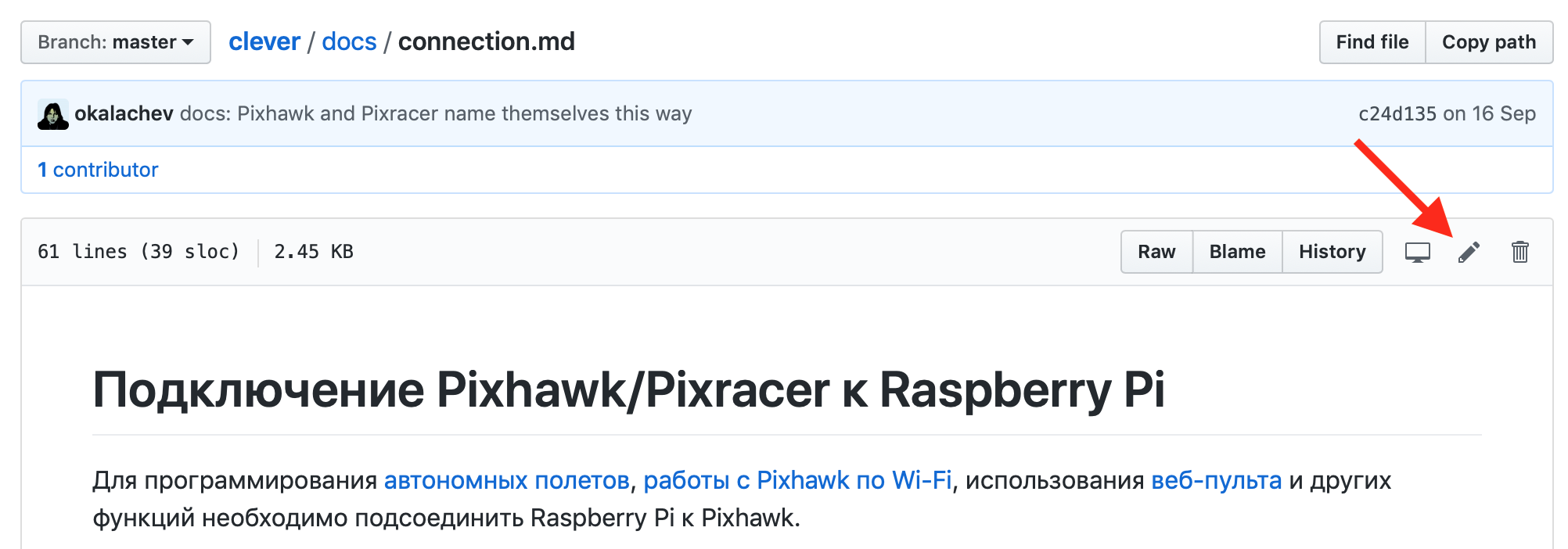
-
Внесите необходимые изменения.
-
Нажмите кнопку "Propose file change".
-
Опишите ваше изменение и нажмите кнопку "Create Pull Request".
-
Ожидайте принятия ваших изменений :)

Более подробную информацию о Pull Request'ах смотрите на GitHub (англ.) или в документации по git (русск.).
Добавление статьи в GitBook
Note
Если вы реализовали собственный интересный проект на Клевере, вы можете добавить статью о нем в раздел "Проекты на базе Клевера".
Подготовьте вашу статью и пришлите Pull Request с ней в репозиторий Клевера.
-
Сделайте форк репозитория Клевера:

-
Склонируйте форк на компьютер:
git clone https://github.com/<USERNAME>/clover.git -
Перейдите в директорию с форком и создайте новую ветку с названием вашей статьи (например
new-article):git checkout -b new-article -
Напишите новую статью в разделе
docs/ruилиdocs/enв формате Markdown (напримерdocs/ru/new_article.md). Не забудьте указать контактную информацию (e-mail / Telegram /...) для авторских статей. -
Поместите дополнительные визуальные материалы в папку
docs/assetsи оформите на них ссылки в вашей статье. -
Добавьте статью в файл оглавления
SUMMARY.mdв том разделе, где вы её написали (например вdocs/ru/SUMMARY.md):... * Дополнительные материалы * [Олимпиада НТИ 2019](nti2019.md) * [Вклад в Клевер](contributing.md) * [Новая статья](new_article.md) * [Сборка и модификация образа Клевера](image_building.md) * [Прошивка ESC контроллеров](esc_firmware.md) ... -
Сохраните состояние ваших изменений локально:
git add docs/ git commit -m "Add new article for Clover" -
Загрузите вашу новую ветку с изменениями на ваш GitHub репозиторий с форком Клевера:
git push -u origin new-article -
Перейдите на web страницу вашего форка и сделайте
pull requestвашей ветки в master Клевера: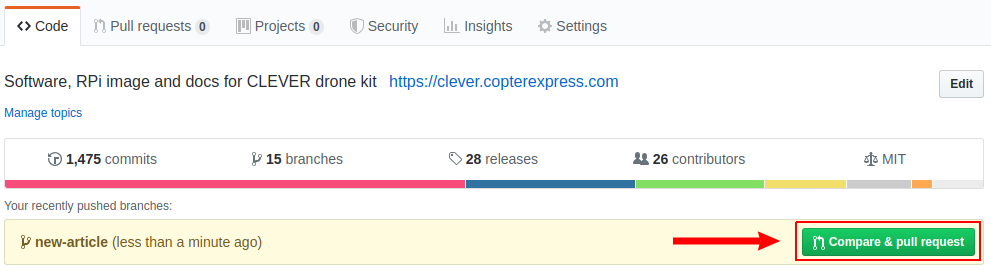
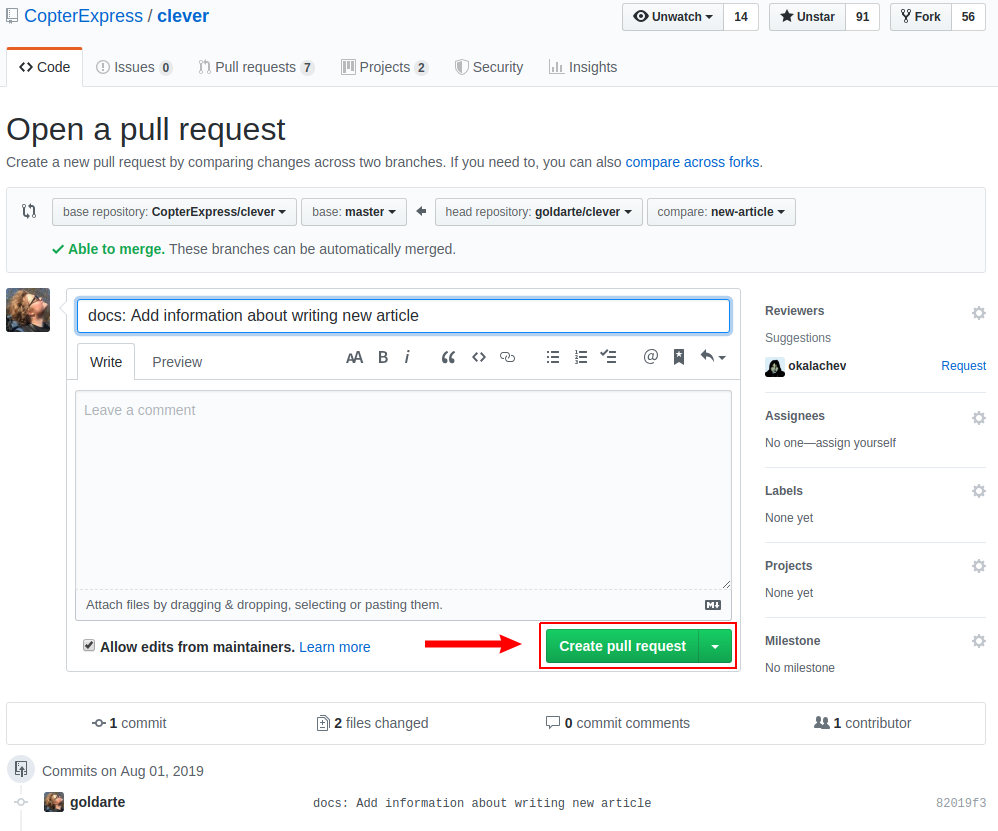
-
Дождитесь комментариев на свою статью, сделайте правки, если потребуется.
-
Порадуйтесь своей новой полезной статье, опубликованной на https://clover.coex.tech !


Простой способ
Если вышеприведенные инструкции для вас оказываются слишком сложными, отправляйте правки или новые статьи по e-mail (okalachev@gmail.com) или в Telegram (пользователь @okalachev).
Публикация пакетов
Вы также можете опубликовать собственный пакет, расширяющий функциональность Клевера, в Debian-репозитории COEX.