Compare commits
2 Commits
roslaunch_
...
new-readme
| Author | SHA1 | Date | |
|---|---|---|---|

|
34560c0b34 | ||
|
|
4bf9f728b1 |
@@ -73,11 +73,8 @@ jobs:
|
|||||||
node_js:
|
node_js:
|
||||||
- "10"
|
- "10"
|
||||||
before_script:
|
before_script:
|
||||||
- sudo sh -c "echo ttf-mscorefonts-installer msttcorefonts/accepted-mscorefonts-eula select true | debconf-set-selections"
|
|
||||||
- sudo apt update && sudo apt install -y calibre msttcorefonts
|
|
||||||
- npm install gitbook-cli -g
|
- npm install gitbook-cli -g
|
||||||
- npm install markdownlint-cli -g
|
- npm install markdownlint-cli -g
|
||||||
- npm install svgexport -g
|
|
||||||
- gitbook -V
|
- gitbook -V
|
||||||
- markdownlint -V
|
- markdownlint -V
|
||||||
script:
|
script:
|
||||||
@@ -86,7 +83,6 @@ jobs:
|
|||||||
- ./check_unused_assets.py
|
- ./check_unused_assets.py
|
||||||
- gitbook install
|
- gitbook install
|
||||||
- gitbook build
|
- gitbook build
|
||||||
- gitbook pdf ./ _book/clover.pdf
|
|
||||||
deploy:
|
deploy:
|
||||||
provider: pages
|
provider: pages
|
||||||
local_dir: _book
|
local_dir: _book
|
||||||
|
|||||||
169
README.md
@@ -1,40 +1,173 @@
|
|||||||
# COEX Clover Drone Kit
|
# COEX Clover Drone Kit
|
||||||
|
|
||||||
<img src="docs/assets/clever4-front-white.png" align="right" width="400px" alt="Clover Drone">
|
<table align=center>
|
||||||
|
<tr>
|
||||||
|
<td align=center><a href="https://px4.io"><img src="docs/assets/px4.svg" height=60></a></td>
|
||||||
|
<td align=center><a href="https://www.raspberrypi.org"><img src="docs/assets/rpi.svg" height=60></a></td>
|
||||||
|
<td align=center><a href="https://www.ros.org"><img src="docs/assets/ros.svg" height=60></a></td>
|
||||||
|
</tr>
|
||||||
|
</table>
|
||||||
|
|
||||||
Clover is an educational programmable drone kit consisting of an unassembled quadcopter, open source software and documentation. The kit includes Pixracer-compatible autopilot running PX4 firmware, Raspberry Pi 4 as companion computer, a camera for computer vision navigation as well as additional sensors and peripheral devices.
|
This repository contains documentation, software platform source code and RPi image builder for COEX Clover drone kit.
|
||||||
|
|
||||||
The main documentation is available [on Gitbook](https://clover.coex.tech/).
|
<img src="docs/assets/clover42.png" align="right" width="400px" alt="COEX Clover">
|
||||||
|
|
||||||
Official website: <a href="https://coex.tech/clover">coex.tech/clover</a>.
|
Clover is a [PX4](https://px4.io)- and [ROS](https://www.ros.org)-powered educational programmable drone kit consisting of an unassembled quadcopter, open source software and documentation. The kit includes Pixracer-compatible autopilot, Raspberry Pi 4 as companion computer, a camera for computer vision navigation as well as additional sensors and peripheral devices.
|
||||||
|
|
||||||
## Video compilation
|
The main documentation is available at [https://clover.coex.tech](https://clover.coex.tech/). Official website: <a href="https://coex.tech/clover">coex.tech/clover</a>.
|
||||||
|
|
||||||
|
## Autonomous flights video
|
||||||
|
|
||||||
[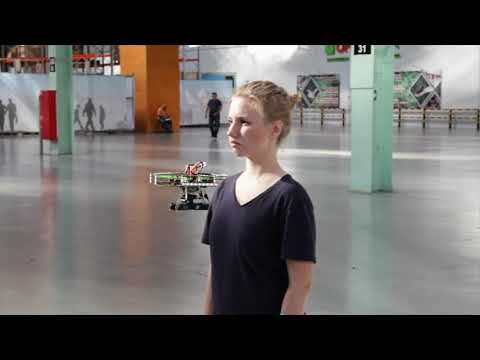](https://youtu.be/u3omgsYC4Fk)
|
[](https://youtu.be/u3omgsYC4Fk)
|
||||||
|
|
||||||
Clover drone is used on a wide range of educational events, including [Copter Hack](https://www.youtube.com/watch?v=xgXheg3TTs4), WorldSkills Drone Operation competition, [Autonomous Vehicles Track of NTI Olympics 2016–2020](https://www.youtube.com/watch?v=E1_ehvJRKxg), Quadro Hack 2019 (National University of Science and Technology MISiS), Russian Robot Olympiad (autonomous flights), and others.
|
Clover drone is used on a wide range of educational events, including [Copter Hack](https://www.youtube.com/watch?v=xgXheg3TTs4), WorldSkills Drone Operation competition, [Autonomous Vehicles Track of NTI Olympics 2016–2020](https://www.youtube.com/watch?v=E1_ehvJRKxg), Quadro Hack 2019 (National University of Science and Technology MISiS), Russian Robot Olympiad (autonomous flights), and others.
|
||||||
|
|
||||||
## Raspberry Pi image
|
## Features
|
||||||
|
|
||||||
Preconfigured image for Raspberry Pi with installed and configured software, ready to fly, is available [in the Releases section](https://github.com/CopterExpress/clover/releases).
|
### Prebuilt RPi image
|
||||||
|
|
||||||
[](https://travis-ci.org/CopterExpress/clover)
|
...
|
||||||
|
|
||||||
Image features:
|
### Common robotics software
|
||||||
|
|
||||||
* Raspbian Buster
|
Prebuilt image for Raspberry Pi includes:
|
||||||
* [ROS Melodic](http://wiki.ros.org/melodic)
|
|
||||||
* Configured networking
|
|
||||||
* OpenCV
|
|
||||||
* [`mavros`](http://wiki.ros.org/mavros)
|
|
||||||
* Periphery drivers for ROS ([GPIO](https://clover.coex.tech/en/gpio.html), [LED strip](https://clover.coex.tech/en/leds.html), etc)
|
|
||||||
* `aruco_pose` package for marker-assisted navigation
|
|
||||||
* `clover` package for autonomous drone control
|
|
||||||
|
|
||||||
API description for autonomous flights is available [on GitBook](https://clover.coex.tech/en/simple_offboard.html).
|
|Software|Description|
|
||||||
|
|-|-|
|
||||||
|
|Raspbian Buster||
|
||||||
|
|[ROS Melodic](http://wiki.ros.org/melodic)|Common robotics framework|
|
||||||
|
|[OpenCV](https://opencv.org)|Computer vision library|
|
||||||
|
|[`mavros`](http://wiki.ros.org/mavros)|ROS package for communication with the flight controller|
|
||||||
|
|Configured networking||
|
||||||
|
|Periphery drivers for ROS ([GPIO](https://clover.coex.tech/en/gpio.html), [LED strip](https://clover.coex.tech/en/leds.html), etc)||
|
||||||
|
|`clover`|package for autonomous drone control|
|
||||||
|
|`aruco_pose`|Package for marker-assisted navigation|
|
||||||
|
|
||||||
|
### QGroundControl Wi-Fi bridge
|
||||||
|
|
||||||
|
...
|
||||||
|
|
||||||
|
### Easy autonomous flights programming
|
||||||
|
|
||||||
|
By using `clover` package, taking off, navigating and landing is just:
|
||||||
|
|
||||||
|
```python
|
||||||
|
navigate(x=0, y=0, z=1, frame_id='body', auto_arm=True) # takeoff and hover 1 m above the ground
|
||||||
|
```
|
||||||
|
|
||||||
|
```python
|
||||||
|
navigate(x=1, y=0, z=0, frame_id='body') # fly forward 1 m
|
||||||
|
```
|
||||||
|
|
||||||
|
```
|
||||||
|
land()
|
||||||
|
```
|
||||||
|
|
||||||
|
See [programming documentation](https://clover.coex.tech) for further information.
|
||||||
|
|
||||||
|
### Optical flow positioning
|
||||||
|
|
||||||
|
<img src="docs/assets/optical-flow.gif">
|
||||||
|
|
||||||
|
RPi based optical flow....
|
||||||
|
|
||||||
|
See [details](https://clover.coex.tech/en/optical_flow.html) in the documentation.
|
||||||
|
|
||||||
|
### ArUco markers recognizing
|
||||||
|
|
||||||
|
<img src="docs/assets/aruco.gif">
|
||||||
|
|
||||||
|
...
|
||||||
|
|
||||||
|
See [details](https://clover.coex.tech/en/aruco.html) in the documentation.
|
||||||
|
|
||||||
|
### Easy working with peripheral devices
|
||||||
|
|
||||||
|
Preinstalled package for the [LED strip](https://clover.coex.tech/en/leds.html) allows high-level control (such as rainbow effect or color fade) as well as individual LED low-level control:
|
||||||
|
|
||||||
|
```python
|
||||||
|
set_effect(r=0, g=100, b=0) # fill strip with green color
|
||||||
|
```
|
||||||
|
|
||||||
|
```python
|
||||||
|
set_effect(effect='fade', r=0, g=0, b=255) # fade to blue color
|
||||||
|
```
|
||||||
|
|
||||||
|
```python
|
||||||
|
set_effect(effect='rainbow') # show rainbow
|
||||||
|
```
|
||||||
|
|
||||||
|
Preinstalled [VL53L1X rangefinder driver](https://clover.coex.tech/en/laser.html) passes data to the flight controller automatically and allows the user to get its data:
|
||||||
|
|
||||||
|
```python
|
||||||
|
data = rospy.wait_for_message('rangefinder/range', Range) # get data from the rangefinder
|
||||||
|
```
|
||||||
|
|
||||||
|
Preinstalled fast Python [GPIO library](https://clover.coex.tech/en/gpio.html).
|
||||||
|
|
||||||
|
```python
|
||||||
|
pi.write(11, 1) # set signal of pin 11 to high
|
||||||
|
```
|
||||||
|
|
||||||
|
```python
|
||||||
|
level = pi.read(12) # read the state of pin 12
|
||||||
|
```
|
||||||
|
|
||||||
|
### Simulator
|
||||||
|
|
||||||
|
<img src="docs/assets/simulator.jpg" width=400 align=center>
|
||||||
|
|
||||||
|
Clover repository includes three simulation-related repository for Gazebo-based simulation.
|
||||||
|
|
||||||
|
Screenshot...
|
||||||
|
|
||||||
|
See details in the [documentation](https://clover.coex.tech/en/simulation.html). The simulation environment also available as a virtual machine image.
|
||||||
|
|
||||||
|
### Remote control apps
|
||||||
|
|
||||||
|
<table>
|
||||||
|
<tr>
|
||||||
|
<td>
|
||||||
|
<a href="https://itunes.apple.com/ru/app/clever-rc/id1396166572?mt=8">
|
||||||
|
<img src="docs/assets/appstore.svg" height=40>
|
||||||
|
</a>
|
||||||
|
</td>
|
||||||
|
<td>
|
||||||
|
<a href="https://play.google.com/store/apps/details?id=express.copter.cleverrc">
|
||||||
|
<img src="docs/assets/google_play.png" height=40>
|
||||||
|
</a>
|
||||||
|
</td>
|
||||||
|
</tr>
|
||||||
|
</table>
|
||||||
|
|
||||||
|
<!-- <a href="https://itunes.apple.com/ru/app/clever-rc/id1396166572?mt=8"><img src="docs/assets/appstore.svg"></a><a href="https://play.google.com/store/apps/details?id=express.copter.cleverrc"><img src="docs/assets/google_play.png" width="15%"></a> -->
|
||||||
|
|
||||||
|
### Community
|
||||||
|
|
||||||
|
<img src="docs/assets/community/collage.jpg" width=400 align=center>
|
||||||
|
|
||||||
|
Clover is widely used ...
|
||||||
|
|
||||||
|
[Telegram chat](tg://resolve?domain=COEXHelpdesk)...
|
||||||
|
|
||||||
|
### Free and open source
|
||||||
|
|
||||||
|
The Clover software bundle is free, open source, and compatible with any PX4/ROS-based drone.
|
||||||
|
|
||||||
|
## Manual installation
|
||||||
|
|
||||||
For manual package installation and running see [`clover` package documentation](clover/README.md).
|
For manual package installation and running see [`clover` package documentation](clover/README.md).
|
||||||
|
|
||||||
|
## PX4 Dev Summit 2019 talk
|
||||||
|
|
||||||
|
[](http://www.youtube.com/watch?v=CTG9E9PbJQ8)
|
||||||
|
|
||||||
|
## Other resources
|
||||||
|
|
||||||
|
* Official documentation: [https://clover.coex.tech](https://clover.coex.tech).
|
||||||
|
* ROS Wiki page: [https://wiki.ros.org/Robots/clover](https://wiki.ros.org/Robots/clover).
|
||||||
|
* ROS Robots page: [https://robots.ros.org/clover](https://robots.ros.org/clover).
|
||||||
|
|
||||||
## License
|
## License
|
||||||
|
|
||||||
While the Clover platform source code is available under the MIT License, note, that the [documentation](docs/) is licensed under the Creative Commons Attribution-NonCommercial-ShareAlike 4.0 International License.
|
While the Clover platform source code is available under the MIT License, note, that the [documentation](docs/) is licensed under the Creative Commons Attribution-NonCommercial-ShareAlike 4.0 International License.
|
||||||
|
|||||||
@@ -13,7 +13,7 @@
|
|||||||
Generate map file for aruco_map nodelet.
|
Generate map file for aruco_map nodelet.
|
||||||
|
|
||||||
Usage:
|
Usage:
|
||||||
genmap.py <length> <x> <y> <dist_x> <dist_y> [<first>] [<x0>] [<y0>] [--top-left | --bottom-left]
|
genmap.py <length> <x> <y> <dist_x> <dist_y> [<first>] [--top-left | --bottom-left]
|
||||||
genmap.py (-h | --help)
|
genmap.py (-h | --help)
|
||||||
|
|
||||||
Options:
|
Options:
|
||||||
@@ -23,8 +23,6 @@ Options:
|
|||||||
<dist_x> Distance between markers along X axis
|
<dist_x> Distance between markers along X axis
|
||||||
<dist_y> Distance between markers along Y axis
|
<dist_y> Distance between markers along Y axis
|
||||||
<first> First marker ID [default: 0]
|
<first> First marker ID [default: 0]
|
||||||
<x0> X coordinate for the first marker [default: 0]
|
|
||||||
<y0> Y coordinate for the first marker [default: 0]
|
|
||||||
--top-left First marker is on top-left (default)
|
--top-left First marker is on top-left (default)
|
||||||
--bottom-left First marker is on bottom-left
|
--bottom-left First marker is on bottom-left
|
||||||
|
|
||||||
@@ -41,22 +39,20 @@ arguments = docopt(__doc__)
|
|||||||
|
|
||||||
length = float(arguments['<length>'])
|
length = float(arguments['<length>'])
|
||||||
first = int(arguments['<first>'] if arguments['<first>'] is not None else 0)
|
first = int(arguments['<first>'] if arguments['<first>'] is not None else 0)
|
||||||
x0 = float(arguments['<x0>'] if arguments['<x0>'] is not None else 0)
|
|
||||||
y0 = float(arguments['<y0>'] if arguments['<y0>'] is not None else 0)
|
|
||||||
markers_x = int(arguments['<x>'])
|
markers_x = int(arguments['<x>'])
|
||||||
markers_y = int(arguments['<y>'])
|
markers_y = int(arguments['<y>'])
|
||||||
dist_x = float(arguments['<dist_x>'])
|
dist_x = float(arguments['<dist_x>'])
|
||||||
dist_y = float(arguments['<dist_y>'])
|
dist_y = float(arguments['<dist_y>'])
|
||||||
bottom_left = arguments['--bottom-left']
|
bottom_left = arguments['--bottom-left']
|
||||||
|
|
||||||
max_y = y0 + (markers_y - 1) * dist_y
|
max_y = (markers_y - 1) * dist_y
|
||||||
|
|
||||||
print('# id\tlength\tx\ty\tz\trot_z\trot_y\trot_x')
|
print('# id\tlength\tx\ty\tz\trot_z\trot_y\trot_x')
|
||||||
for y in range(markers_y):
|
for y in range(markers_y):
|
||||||
for x in range(markers_x):
|
for x in range(markers_x):
|
||||||
pos_x = x0 + x * dist_x
|
pos_x = x * dist_x
|
||||||
pos_y = y0 + y * dist_y
|
pos_y = y * dist_y
|
||||||
if not bottom_left:
|
if not bottom_left:
|
||||||
pos_y = max_y - pos_y
|
pos_y = max_y - pos_y
|
||||||
print('{}\t{}\t{}\t{}\t{}\t{}\t{}\t{}'.format(first, length, pos_x, pos_y, 0, 0, 0, 0))
|
print('{}\t{}\t{}\t{}\t{}\t{}\t{}\t{}\t'.format(first, length, pos_x, pos_y, 0, 0, 0, 0))
|
||||||
first += 1
|
first += 1
|
||||||
|
|||||||
@@ -1,10 +1,7 @@
|
|||||||
<launch>
|
<launch>
|
||||||
<arg name="aruco_detect" default="false"/> <!-- markers recognition enabled -->
|
<arg name="aruco_detect" default="true"/>
|
||||||
<arg name="aruco_map" default="false"/> <!-- markers map recognition enabled -->
|
<arg name="aruco_map" default="false"/>
|
||||||
<arg name="aruco_vpe" default="false"/> <!-- markers map positioning enabled -->
|
<arg name="aruco_vpe" default="false"/>
|
||||||
<arg name="placement" default="floor"/> <!-- markers placement: floor, ceiling, unknown -->
|
|
||||||
<arg name="length" default="0.33"/> <!-- not-in-map markers length, m -->
|
|
||||||
<arg name="map" default="map.txt"/> <!-- markers map file name -->
|
|
||||||
|
|
||||||
<!-- For additional help go to https://clover.coex.tech/aruco -->
|
<!-- For additional help go to https://clover.coex.tech/aruco -->
|
||||||
|
|
||||||
@@ -15,9 +12,8 @@
|
|||||||
<remap from="map_markers" to="aruco_map/markers" if="$(arg aruco_map)"/>
|
<remap from="map_markers" to="aruco_map/markers" if="$(arg aruco_map)"/>
|
||||||
<param name="estimate_poses" value="true"/>
|
<param name="estimate_poses" value="true"/>
|
||||||
<param name="send_tf" value="true"/>
|
<param name="send_tf" value="true"/>
|
||||||
<param name="known_tilt" value="map" if="$(eval placement == 'floor')"/>
|
<param name="known_tilt" value="map"/>
|
||||||
<param name="known_tilt" value="map_flipped" if="$(eval position == 'ceiling')"/>
|
<param name="length" value="0.33"/>
|
||||||
<param name="length" value="$(arg length)"/>
|
|
||||||
<!-- aruco detector parameters -->
|
<!-- aruco detector parameters -->
|
||||||
<param name="cornerRefinementMethod" value="2"/> <!-- contour refinement -->
|
<param name="cornerRefinementMethod" value="2"/> <!-- contour refinement -->
|
||||||
<param name="minMarkerPerimeterRate" value="0.075"/> <!-- 0.075 for 320x240, 0.0375 for 640x480 -->
|
<param name="minMarkerPerimeterRate" value="0.075"/> <!-- 0.075 for 320x240, 0.0375 for 640x480 -->
|
||||||
@@ -28,9 +24,8 @@
|
|||||||
<remap from="image_raw" to="main_camera/image_raw"/>
|
<remap from="image_raw" to="main_camera/image_raw"/>
|
||||||
<remap from="camera_info" to="main_camera/camera_info"/>
|
<remap from="camera_info" to="main_camera/camera_info"/>
|
||||||
<remap from="markers" to="aruco_detect/markers"/>
|
<remap from="markers" to="aruco_detect/markers"/>
|
||||||
<param name="map" value="$(find aruco_pose)/map/$(arg map)"/>
|
<param name="map" value="$(find aruco_pose)/map/map.txt"/>
|
||||||
<param name="known_tilt" value="map" if="$(eval placement == 'floor')"/>
|
<param name="known_tilt" value="map"/>
|
||||||
<param name="known_tilt" value="map_flipped" if="$(eval placement == 'ceiling')"/>
|
|
||||||
<param name="image_axis" value="true"/>
|
<param name="image_axis" value="true"/>
|
||||||
<param name="frame_id" value="aruco_map_detected" if="$(arg aruco_vpe)"/>
|
<param name="frame_id" value="aruco_map_detected" if="$(arg aruco_vpe)"/>
|
||||||
<param name="frame_id" value="aruco_map" unless="$(arg aruco_vpe)"/>
|
<param name="frame_id" value="aruco_map" unless="$(arg aruco_vpe)"/>
|
||||||
|
|||||||
@@ -1,15 +1,16 @@
|
|||||||
<launch>
|
<launch>
|
||||||
<arg name="fcu_conn" default="usb"/> <!-- FCU connection type: usb, uart, tcp, udp, sitl -->
|
<arg name="fcu_conn" default="usb"/>
|
||||||
<arg name="fcu_ip" default="127.0.0.1"/> <!-- FCU IP adddress (if using TCP/UDP) -->
|
<arg name="fcu_ip" default="127.0.0.1"/>
|
||||||
<arg name="fcu_sys_id" default="1"/> <!-- MAVLink system ID, noeditor -->
|
<arg name="fcu_sys_id" default="1"/>
|
||||||
<arg name="gcs_bridge" default="tcp"/> <!-- GCS bridge type: tcp, udp, udp-b, udp-pb -->
|
<arg name="gcs_bridge" default="tcp"/>
|
||||||
<arg name="web_video_server" default="true"/> <!-- web video server enabled -->
|
<arg name="web_video_server" default="true"/>
|
||||||
<arg name="rosbridge" default="true"/> <!-- rosbridge_suite enabled, noeditor -->
|
<arg name="rosbridge" default="true"/>
|
||||||
<arg name="main_camera" default="true"/> <!-- main camera enabled -->
|
<arg name="main_camera" default="true"/>
|
||||||
<arg name="optical_flow" default="true"/> <!-- optical flow enabled -->
|
<arg name="optical_flow" default="true"/>
|
||||||
<arg name="rangefinder_vl53l1x" default="true"/> <!-- VL53l1X rangefinder enabled -->
|
<arg name="aruco" default="false"/>
|
||||||
<arg name="led" default="true"/> <!-- LED strip driver enabled -->
|
<arg name="rangefinder_vl53l1x" default="true"/>
|
||||||
<arg name="rc" default="true"/> <!-- support for mobile RC enabled -->
|
<arg name="led" default="true"/>
|
||||||
|
<arg name="rc" default="true"/>
|
||||||
<arg name="shell" default="true"/>
|
<arg name="shell" default="true"/>
|
||||||
|
|
||||||
<!-- log formatting -->
|
<!-- log formatting -->
|
||||||
@@ -30,7 +31,7 @@
|
|||||||
</node>
|
</node>
|
||||||
|
|
||||||
<!-- aruco markers -->
|
<!-- aruco markers -->
|
||||||
<include file="$(find clover)/launch/aruco.launch"/>
|
<include file="$(find clover)/launch/aruco.launch" if="$(arg aruco)"/>
|
||||||
|
|
||||||
<!-- optical flow -->
|
<!-- optical flow -->
|
||||||
<node pkg="nodelet" type="nodelet" name="optical_flow" args="load clover/optical_flow nodelet_manager" if="$(arg optical_flow)" clear_params="true" output="screen">
|
<node pkg="nodelet" type="nodelet" name="optical_flow" args="load clover/optical_flow nodelet_manager" if="$(arg optical_flow)" clear_params="true" output="screen">
|
||||||
@@ -86,11 +87,4 @@
|
|||||||
<node pkg="roswww_static" name="roswww_static" type="main.py" clear_params="true">
|
<node pkg="roswww_static" name="roswww_static" type="main.py" clear_params="true">
|
||||||
<param name="default_package" value="clover"/>
|
<param name="default_package" value="clover"/>
|
||||||
</node>
|
</node>
|
||||||
|
|
||||||
<!-- roslaunch editor parameters -->
|
|
||||||
<group ns="roslaunch_editor">
|
|
||||||
<param name="items" type="yaml" value="[clover/clover.launch, clover/main_camera.launch, clover/aruco.launch, clover/led.launch]"/>
|
|
||||||
<param name="apply_command" value="sudo systemctl restart clover"/>
|
|
||||||
<param name="hide_uncommented" value="true"/>
|
|
||||||
</group>
|
|
||||||
</launch>
|
</launch>
|
||||||
|
|||||||
@@ -1,7 +1,7 @@
|
|||||||
<launch>
|
<launch>
|
||||||
<arg name="ws281x" default="true"/> <!-- LED strip driver enabled -->
|
<arg name="ws281x" default="true"/>
|
||||||
<arg name="led_effect" default="true"/> <!-- LED effect API enabled -->
|
<arg name="led_effect" default="true"/>
|
||||||
<arg name="led_notify" default="all"/> <!-- LED strip notifications: all, battery, none -->
|
<arg name="led_notify" default="true"/>
|
||||||
|
|
||||||
<!-- For additional help go to https://clover.coex.tech/led -->
|
<!-- For additional help go to https://clover.coex.tech/led -->
|
||||||
|
|
||||||
@@ -22,7 +22,7 @@
|
|||||||
<param name="fade_period" value="0.5"/>
|
<param name="fade_period" value="0.5"/>
|
||||||
<param name="rainbow_period" value="5"/>
|
<param name="rainbow_period" value="5"/>
|
||||||
<!-- events effects table -->
|
<!-- events effects table -->
|
||||||
<rosparam param="notify" if="$(eval led_notify == 'all')">
|
<rosparam param="notify" if="$(arg led_notify)">
|
||||||
startup: { r: 255, g: 255, b: 255 }
|
startup: { r: 255, g: 255, b: 255 }
|
||||||
connected: { effect: rainbow }
|
connected: { effect: rainbow }
|
||||||
disconnected: { effect: blink, r: 255, g: 50, b: 50 }
|
disconnected: { effect: blink, r: 255, g: 50, b: 50 }
|
||||||
@@ -34,8 +34,5 @@
|
|||||||
low_battery: { threshold: 3.7, effect: blink_fast, r: 255, g: 0, b: 0 }
|
low_battery: { threshold: 3.7, effect: blink_fast, r: 255, g: 0, b: 0 }
|
||||||
error: { effect: flash, r: 255, g: 0, b: 0 }
|
error: { effect: flash, r: 255, g: 0, b: 0 }
|
||||||
</rosparam>
|
</rosparam>
|
||||||
<rosparam param="notify" if="$(eval led_notify == 'battery')">
|
|
||||||
low_battery: { threshold: 3.7, effect: blink_fast, r: 255, g: 0, b: 0 }
|
|
||||||
</rosparam>
|
|
||||||
</node>
|
</node>
|
||||||
</launch>
|
</launch>
|
||||||
|
|||||||

|
Before Width: | Height: | Size: 65 KiB |
BIN
docs/assets/aruco.gif
Normal file

|
After Width: | Height: | Size: 2.1 MiB |

|
Before Width: | Height: | Size: 463 KiB |

|
Before Width: | Height: | Size: 433 KiB |

|
Before Width: | Height: | Size: 591 KiB |

|
Before Width: | Height: | Size: 350 KiB |

|
Before Width: | Height: | Size: 435 KiB |

|
Before Width: | Height: | Size: 468 KiB |

|
Before Width: | Height: | Size: 476 KiB |

|
Before Width: | Height: | Size: 464 KiB |

|
Before Width: | Height: | Size: 472 KiB |

|
Before Width: | Height: | Size: 426 KiB |

|
Before Width: | Height: | Size: 777 KiB |

|
Before Width: | Height: | Size: 455 KiB |

|
Before Width: | Height: | Size: 446 KiB |

|
Before Width: | Height: | Size: 304 KiB |

|
Before Width: | Height: | Size: 320 KiB |

|
Before Width: | Height: | Size: 307 KiB |

|
Before Width: | Height: | Size: 152 KiB |

|
Before Width: | Height: | Size: 348 KiB |

|
Before Width: | Height: | Size: 342 KiB |

|
Before Width: | Height: | Size: 346 KiB |

|
Before Width: | Height: | Size: 175 KiB |

|
Before Width: | Height: | Size: 224 KiB |

|
Before Width: | Height: | Size: 558 KiB |

|
Before Width: | Height: | Size: 426 KiB |

|
Before Width: | Height: | Size: 95 KiB |

|
Before Width: | Height: | Size: 155 KiB |

|
Before Width: | Height: | Size: 600 KiB |

|
Before Width: | Height: | Size: 514 KiB |

|
Before Width: | Height: | Size: 651 KiB |

|
Before Width: | Height: | Size: 764 KiB |

|
Before Width: | Height: | Size: 612 KiB |

|
Before Width: | Height: | Size: 290 KiB |

|
Before Width: | Height: | Size: 263 KiB |

|
Before Width: | Height: | Size: 466 KiB |

|
Before Width: | Height: | Size: 433 KiB |

|
Before Width: | Height: | Size: 460 KiB |

|
Before Width: | Height: | Size: 462 KiB |

|
Before Width: | Height: | Size: 632 KiB |

|
Before Width: | Height: | Size: 129 KiB |

|
Before Width: | Height: | Size: 498 KiB |

|
Before Width: | Height: | Size: 514 KiB |

|
Before Width: | Height: | Size: 387 KiB |

|
Before Width: | Height: | Size: 391 KiB |

|
Before Width: | Height: | Size: 82 KiB |

|
Before Width: | Height: | Size: 102 KiB |

|
Before Width: | Height: | Size: 47 KiB |

|
Before Width: | Height: | Size: 108 KiB |

|
Before Width: | Height: | Size: 411 KiB |

|
Before Width: | Height: | Size: 23 KiB |

|
Before Width: | Height: | Size: 41 KiB |

|
Before Width: | Height: | Size: 14 KiB |

|
Before Width: | Height: | Size: 14 KiB |

|
Before Width: | Height: | Size: 19 KiB |

|
Before Width: | Height: | Size: 29 KiB |

|
Before Width: | Height: | Size: 39 KiB |

|
Before Width: | Height: | Size: 10 KiB |

|
Before Width: | Height: | Size: 4.2 KiB |

|
Before Width: | Height: | Size: 12 KiB |

|
Before Width: | Height: | Size: 8.3 KiB |

|
Before Width: | Height: | Size: 10 KiB |

|
Before Width: | Height: | Size: 5.9 KiB |

|
Before Width: | Height: | Size: 3.9 KiB |

|
Before Width: | Height: | Size: 692 KiB |

|
Before Width: | Height: | Size: 553 KiB |

|
Before Width: | Height: | Size: 452 KiB |

|
Before Width: | Height: | Size: 416 KiB |

|
Before Width: | Height: | Size: 518 KiB |

|
Before Width: | Height: | Size: 558 KiB |

|
Before Width: | Height: | Size: 521 KiB |

|
Before Width: | Height: | Size: 153 KiB |

|
Before Width: | Height: | Size: 673 KiB |

|
Before Width: | Height: | Size: 124 KiB |

|
Before Width: | Height: | Size: 190 KiB |

|
Before Width: | Height: | Size: 372 KiB |

|
Before Width: | Height: | Size: 698 KiB |

|
Before Width: | Height: | Size: 96 KiB |

|
Before Width: | Height: | Size: 517 KiB |

|
Before Width: | Height: | Size: 154 KiB |

|
Before Width: | Height: | Size: 594 KiB |

|
Before Width: | Height: | Size: 152 KiB |

|
Before Width: | Height: | Size: 610 KiB |

|
Before Width: | Height: | Size: 629 KiB |

|
Before Width: | Height: | Size: 592 KiB |

|
Before Width: | Height: | Size: 472 KiB |

|
Before Width: | Height: | Size: 101 KiB |

|
Before Width: | Height: | Size: 123 KiB |

|
Before Width: | Height: | Size: 56 KiB |

|
Before Width: | Height: | Size: 133 KiB |

|
Before Width: | Height: | Size: 495 KiB |

|
Before Width: | Height: | Size: 78 KiB |
BIN
docs/assets/clover.png
Normal file

|
After Width: | Height: | Size: 614 KiB |
BIN
docs/assets/clover42.png
Normal file

|
After Width: | Height: | Size: 2.2 MiB |