# Working with a laser rangefinder
> **Note** Documentation for the [image](image.md), versions, starting with **0.18**. For older versions refer to [documentation for version **0.17**](https://github.com/CopterExpress/clover/blob/v0.17/docs/en/laser.md).
## VL53L1X Rangefinder
The rangefinder model recommended for Clover is STM VL53L1X. This rangefinder can measure distances from 0 to 4 m while ensuring high measurement accuracy.
The [image for Raspberry Pi](image.md) contains pre-installed corresponding ROS driver.
### Connecting to Raspberry Pi
> **Note** You need to flash a custom PX4 firmware on your flight controller for the rangefinder to work correctly. See more about firmware in the [corresponding article](firmware.md).
Connect the rangefinder to the 3V, GND, SCL and SDA pins via the I²C interface:
 If the pin marked GND is occupied, you can use any other ground pin (look at the [pinout](https://pinout.xyz) for reference).
> **Hint** You can connect several peripheral devices via the I²C interface simultaneously. Use a parallel connection for that.
### Enabling the rangefinder
[Connect via SSH](ssh.md) and edit file `~/catkin_ws/src/clever/clever/launch/clever.launch` so that the VL53L1X driver is enabled:
```xml
```
By default, the rangefinder driver sends the data to Pixhawk via the `/rangefinder/range` topic. To view data from the topic, use the following command:
```bash
rostopic echo /rangefinder/range
```
### PX4 settings
PX4 should be properly [configured](px4_parameters.md) to use the rangefinder data.
Set the following parameters when EKF2 is used (`SYS_MC_EST_GROUP` = `ekf2`):
* `EKF2_HGT_MODE` = `2` (Range sensor) – for flights over horizontal floor;
* `EKF2_RNG_AID` = `1` (Range aid enabled) – in other cases.
Set the following parameters when LPE is used (`SYS_MC_EST_GROUP` = `local_position_estimator, attitude_estimator_q`):
* The "pub agl as lpos down" flag should be set in the `LPE_FUSION` parameter – for flights over horizontal floor.
### Receiving data in Python
In order to receive data from the topic, create a subscriber:
```python
from sensor_msgs.msg import Range
# ...
def range_callback(msg):
# Process data from the rangefinder
print 'Rangefinder distance:', msg.range
rospy.Subscriber('rangefinder/range', Range, range_callback)
```
Also it's possible to read one rangefinder measurement at a time:
```python
from sensor_msgs.msg import Range
# ...
data = rospy.wait_for_message('rangefinder/range', Range)
```
### Data visualization
You may use rqt_multiplot tool to plot rangefinder data.
rviz may be used for data visualization. To do this, add a topic of the `sensor_msgs/Range` type to visualization:
If the pin marked GND is occupied, you can use any other ground pin (look at the [pinout](https://pinout.xyz) for reference).
> **Hint** You can connect several peripheral devices via the I²C interface simultaneously. Use a parallel connection for that.
### Enabling the rangefinder
[Connect via SSH](ssh.md) and edit file `~/catkin_ws/src/clever/clever/launch/clever.launch` so that the VL53L1X driver is enabled:
```xml
```
By default, the rangefinder driver sends the data to Pixhawk via the `/rangefinder/range` topic. To view data from the topic, use the following command:
```bash
rostopic echo /rangefinder/range
```
### PX4 settings
PX4 should be properly [configured](px4_parameters.md) to use the rangefinder data.
Set the following parameters when EKF2 is used (`SYS_MC_EST_GROUP` = `ekf2`):
* `EKF2_HGT_MODE` = `2` (Range sensor) – for flights over horizontal floor;
* `EKF2_RNG_AID` = `1` (Range aid enabled) – in other cases.
Set the following parameters when LPE is used (`SYS_MC_EST_GROUP` = `local_position_estimator, attitude_estimator_q`):
* The "pub agl as lpos down" flag should be set in the `LPE_FUSION` parameter – for flights over horizontal floor.
### Receiving data in Python
In order to receive data from the topic, create a subscriber:
```python
from sensor_msgs.msg import Range
# ...
def range_callback(msg):
# Process data from the rangefinder
print 'Rangefinder distance:', msg.range
rospy.Subscriber('rangefinder/range', Range, range_callback)
```
Also it's possible to read one rangefinder measurement at a time:
```python
from sensor_msgs.msg import Range
# ...
data = rospy.wait_for_message('rangefinder/range', Range)
```
### Data visualization
You may use rqt_multiplot tool to plot rangefinder data.
rviz may be used for data visualization. To do this, add a topic of the `sensor_msgs/Range` type to visualization:
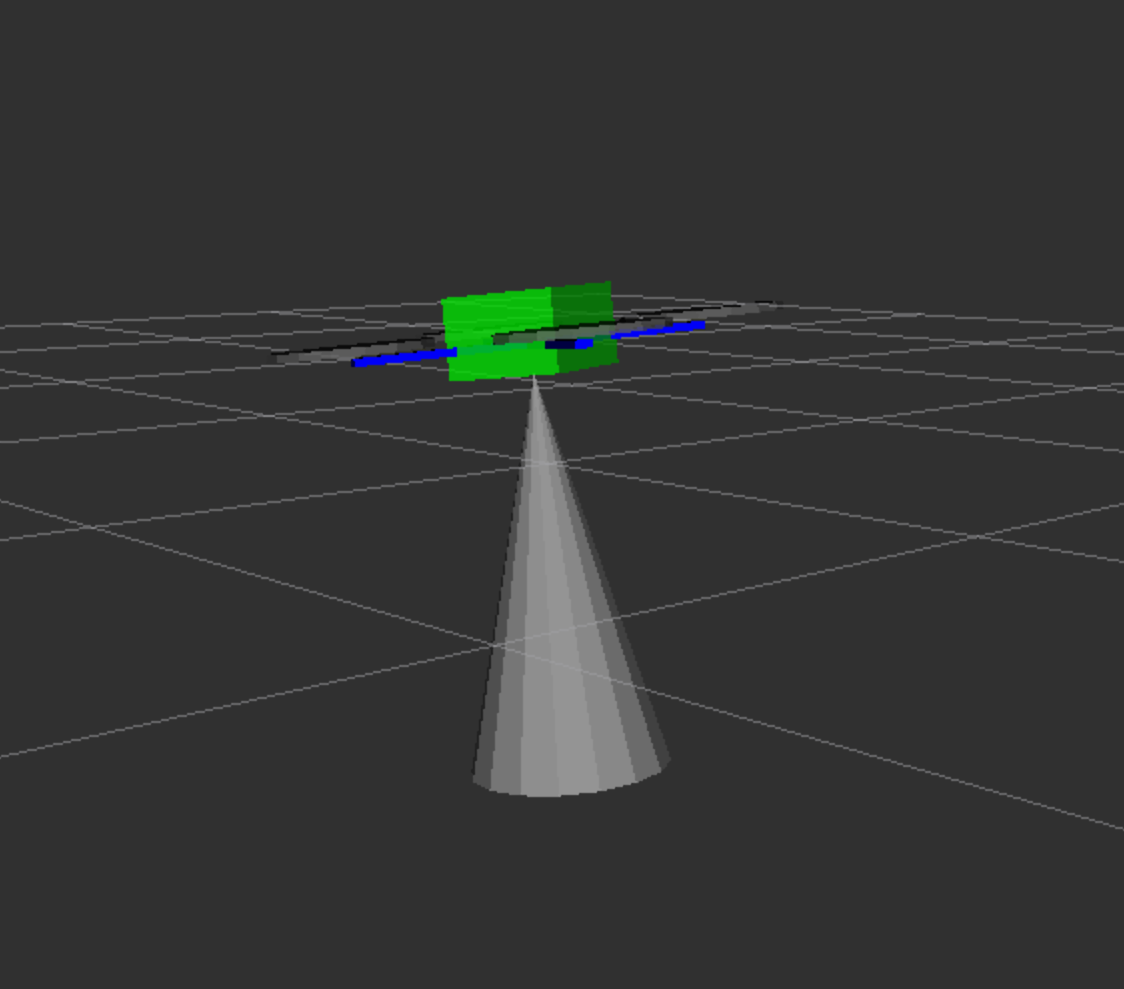 Read more [about rviz and rqt](rviz.md).