# Connecting Raspberry Pi to the flight controller
In order to program [autonomous flights](simple_offboard.md), [work with Pixhawk or Pixracer over Wi-Fi](gcs_bridge.md), use [controller app](rc.md) and access other functions you need to connect your Raspberry Pi to the flight controller.
## USB connection
USB connection is the preferred way to connect to the flight controller.
 1. Connect your FCU to the Raspberry Pi using a microUSB to USB cable.
2. [Connect to the Raspberry Pi over SSH](ssh.md).
3. Make sure that the connection is working properly by [running the following command on the Raspberry Pi](cli.md):
```bash
rostopic echo /mavros/state
```
The `connected` field should have the `True` value.
> **Hint** You need to set the `CBRK_USB_CHK` [parameter](parameters.md) to 197848 for the USB connection to work.
## UART connection
UART connection is another way for the Raspberry Pi and FCU to communicate.
1. Connect your FCU to the Raspberry Pi using a microUSB to USB cable.
2. [Connect to the Raspberry Pi over SSH](ssh.md).
3. Make sure that the connection is working properly by [running the following command on the Raspberry Pi](cli.md):
```bash
rostopic echo /mavros/state
```
The `connected` field should have the `True` value.
> **Hint** You need to set the `CBRK_USB_CHK` [parameter](parameters.md) to 197848 for the USB connection to work.
## UART connection
UART connection is another way for the Raspberry Pi and FCU to communicate.
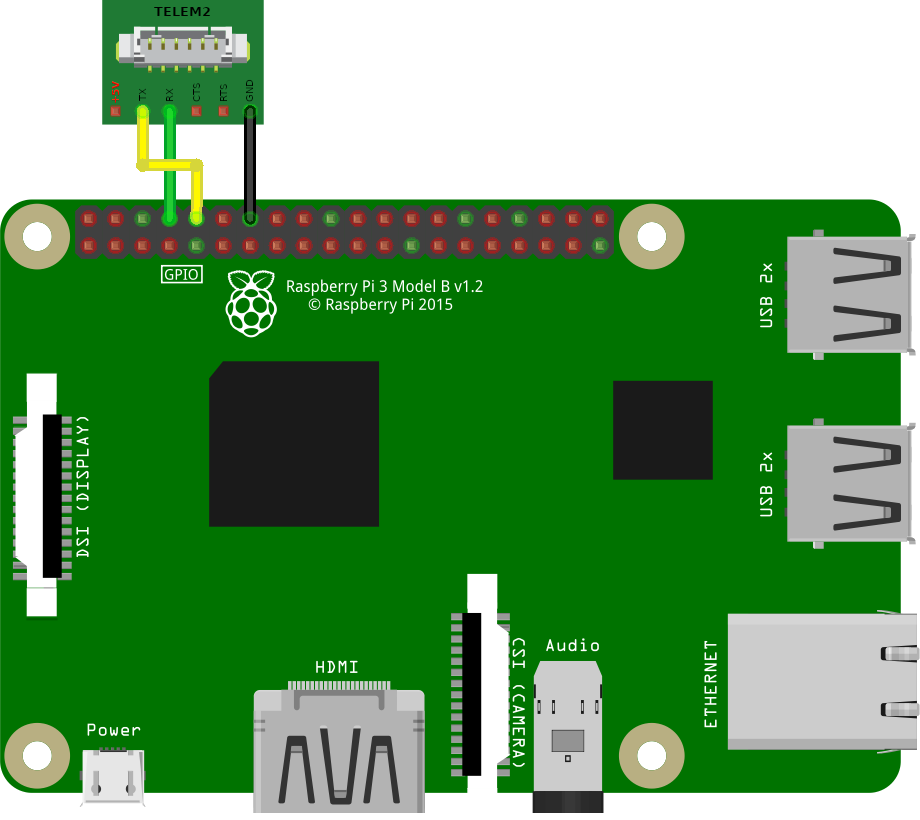 If the pin marked GND is occupied, you can use any other ground pin (look at the [pinout](https://pinout.xyz) for reference).
1. Connect the TELEM 2 port on the flight controller using a UART cable to the Raspberry Pi pins following this instruction: the black cable (*GND*) to Ground, the green cable (*UART_RX*) to *GPIO14*, the yellow cable (*UART_TX*) to *GPIO15*. Do not connect the red cable (*5V*).
2. In PX4 of version v1.9.0 or higher, set parameter values: `MAV_1_CONFIG` to TELEM 2, `SER_TEL2_BAUND` to 921600 8N1. In PX4 of version [prior to v1.9.0](https://github.com/mavlink/qgroundcontrol/issues/6905#issuecomment-464549610) the parameter `SYS_COMPANION` should be set to `Companion Link (921600 baud, 8N1)`, to set it correctly use the old version of QGC [v3.3.1](https://github.com/mavlink/qgroundcontrol/releases/tag/v3.3.1).
3. [Connect to the Raspberry Pi over SSH](ssh.md).
4. Check the presence of the parameters `enable_uart=1` and `dtoverlay=pi 3-disable-bt` in the file `/boot/config.txt` by [running the following command on the Raspberry Pi](cli.md):
```bash
cat /boot/config.txt | grep -E "^enable_uart=.|^dtoverlay=pi3-disable-bt"
```
If the parameters in the file are different or missing, then edit the file and restart the Raspberry Pi.
5. Change the connection type from `usb` to `uart` in the Clover' launch file `~/catkin_ws/src/clover/clover/launch/clover.launch`:
```xml
```
If you change the launch file, you need to restart the `clover' service:
```bash
sudo systemctl restart clover
```
6. Make sure that the connection is working properly by running the following command:
```bash
rostopic echo -n1 /mavros/state
```
The `connected` field should have the `True` value.
Read more in the PX4 docs: https://docs.px4.io/main/en/peripherals/serial_configuration.html.
**Next**: [Using QGroundControl over Wi-Fi](gcs_bridge.md)
If the pin marked GND is occupied, you can use any other ground pin (look at the [pinout](https://pinout.xyz) for reference).
1. Connect the TELEM 2 port on the flight controller using a UART cable to the Raspberry Pi pins following this instruction: the black cable (*GND*) to Ground, the green cable (*UART_RX*) to *GPIO14*, the yellow cable (*UART_TX*) to *GPIO15*. Do not connect the red cable (*5V*).
2. In PX4 of version v1.9.0 or higher, set parameter values: `MAV_1_CONFIG` to TELEM 2, `SER_TEL2_BAUND` to 921600 8N1. In PX4 of version [prior to v1.9.0](https://github.com/mavlink/qgroundcontrol/issues/6905#issuecomment-464549610) the parameter `SYS_COMPANION` should be set to `Companion Link (921600 baud, 8N1)`, to set it correctly use the old version of QGC [v3.3.1](https://github.com/mavlink/qgroundcontrol/releases/tag/v3.3.1).
3. [Connect to the Raspberry Pi over SSH](ssh.md).
4. Check the presence of the parameters `enable_uart=1` and `dtoverlay=pi 3-disable-bt` in the file `/boot/config.txt` by [running the following command on the Raspberry Pi](cli.md):
```bash
cat /boot/config.txt | grep -E "^enable_uart=.|^dtoverlay=pi3-disable-bt"
```
If the parameters in the file are different or missing, then edit the file and restart the Raspberry Pi.
5. Change the connection type from `usb` to `uart` in the Clover' launch file `~/catkin_ws/src/clover/clover/launch/clover.launch`:
```xml
```
If you change the launch file, you need to restart the `clover' service:
```bash
sudo systemctl restart clover
```
6. Make sure that the connection is working properly by running the following command:
```bash
rostopic echo -n1 /mavros/state
```
The `connected` field should have the `True` value.
Read more in the PX4 docs: https://docs.px4.io/main/en/peripherals/serial_configuration.html.
**Next**: [Using QGroundControl over Wi-Fi](gcs_bridge.md)